The Declare → Tag → Run workflow
Everything SpecTracer does reduces to three verbs, done by three different people at three different times, on three files that never need to import or know about each other. This page walks through the loop end to end, then explains why it's shaped that way.
.feature file and state which layers must
cover it. Tag the unit, integration, or E2E test that satisfies it.
Run the suites and hand the results to spec-tracer, which reports
whether the declaration was kept.
The workflow at a glance
Three stages, three artifacts, one command that ties them together. Nothing here talks to anything else directly — SpecTracer is the only thing that reads all three.
Declare
Give the scenario a stable @id: and declare which layers must cover it.
Tag
Add @scenario:FC-42 to the unit/integration test that covers it, in name or tag
form. E2E is exempt — running the feature file already produces that @id:.
Run
Run your suites, then point spec-tracer at the results for one report.
1 · Declare — the feature file is the contract
A scenario is declared once, in one place, independent of which layers will eventually test it — and it can exist before any test does.
Feature: Checkout

  @id:FC-42 @require-unit @require-integration @require-e2e
  Scenario: Card payment succeeds
    Given a cart with one item
    When the customer pays by card
    Then the order is confirmed
@id: is the handle everything else points back at. @require-* is the promise: "this isn't done until every named layer has a passing, linked test." Full detail on both: Tagging model.
2 · Tag — tests claim a scenario, not the other way round
The dependency runs one direction only. A test says "I cover FC-42"; the feature file never
references a test. That means tests can be added, renamed, or moved between suites without
ever touching the .feature file, and a scenario can sit un-covered for a while
without breaking anything — it just shows up honestly as a gap in the report.
In the test name
Rename or parametrize so the tag lands in the JUnit name attribute — no
framework changes required.
As a JUnit property
The cleanest option where supported: a <property name="scenario"
value="@scenario:FC-42"/> that never collides with the test's own name.
Nothing to add, for E2E
An E2E result is produced by running the very feature file the scenario is declared in, so
its Cucumber JSON tags array already carries @id:FC-42. SpecTracer
links E2E results by that @id: directly — no separate @scenario: tag
needed.
Every mechanism is covered in depth, with copy-pasteable examples per framework, in where tags are read from.
3 · Run — your suites, unchanged, plus one new command
Nothing about how tests execute changes. You add the flag that writes machine-readable
output, then run spec-tracer once, pointed at a config file that lists where those
outputs (and the feature files) live.
# suites run exactly as before — just add the output flag
pytest tests/unit        --junitxml=reports/unit.xml
pytest tests/integration --junitxml=reports/int.xml
behave features/         --format json -o reports/e2e.json

# then the one new step
spec-tracer
spec-tracer reads spectracer.config.json, links every result back to
a scenario by its @id: / @scenario:
pair, and writes a self-contained HTML report — optionally a JSON twin and a non-zero exit code
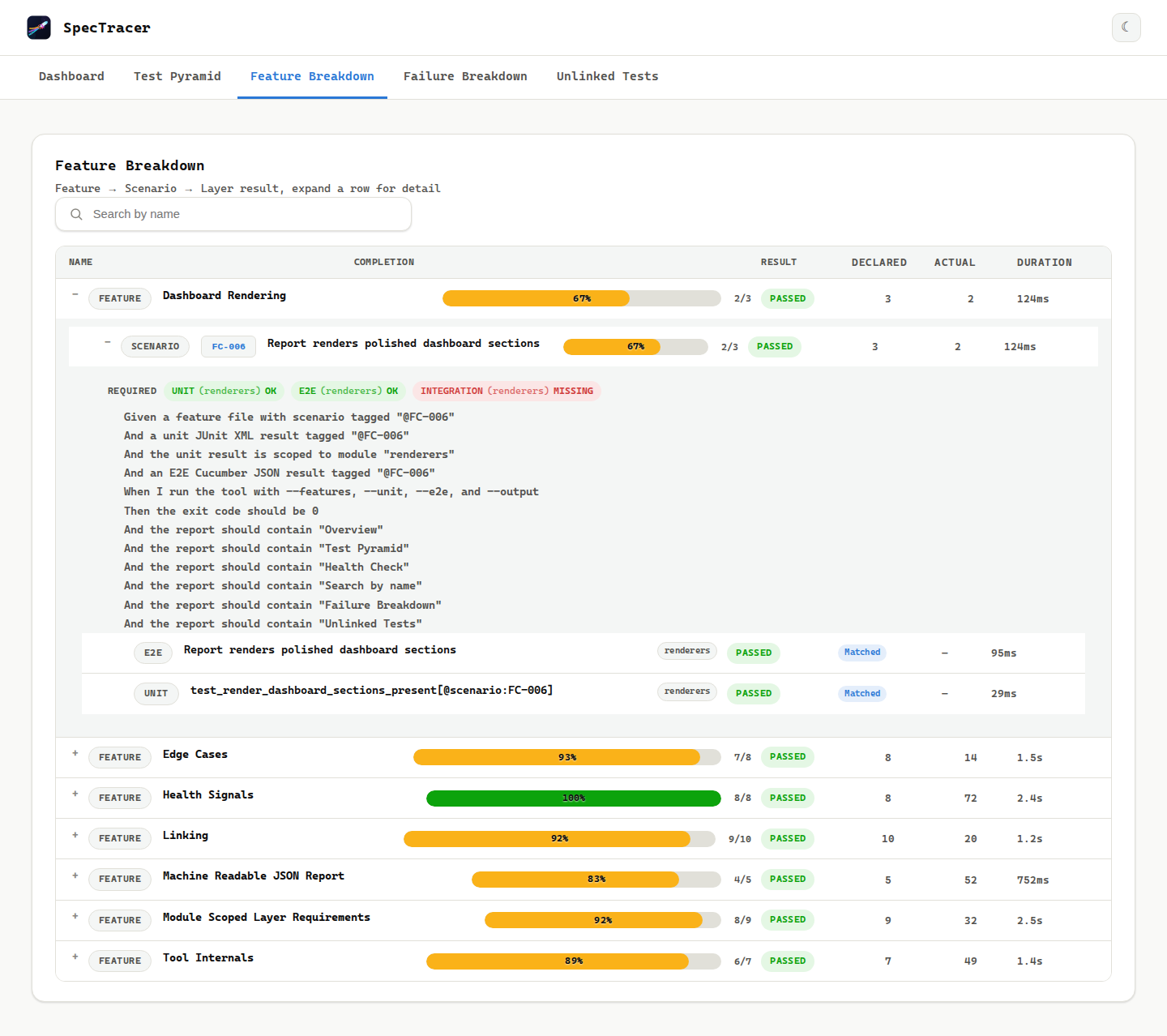
for CI. Config keys: Configuration. What the report shows:
Report tour.
Putting it together
One scenario, tracked through all three stages:
  @id:FC-42 @require-unit @require-e2e
  Scenario: Card payment succeeds
    Given a cart with one item
    When the customer pays by card
Then the order is confirmed@pytest.mark.parametrize("tag", ["@scenario:FC-42"])
def test_card_payment_succeeds(tag):
...{
"features": ["./features"],
"unit": { "": ["./reports/unit.xml"] },
"e2e": { "": ["./reports/e2e.json"] },
"output": "./reports/spectracer-report.html"
}
Why this shape
Ownership stays separated
Declaring what needs testing and writing the test that does it are often different jobs, sometimes different people, sometimes weeks apart. A one-directional pointer (test → scenario) lets both happen independently without a merge conflict in either direction.
No test runner in the loop
SpecTracer never executes anything and never imports your source. It only reads text files your tools already produce, so adding it can't slow down or destabilize a suite.
Gaps are visible, not silent
An un-tagged test and an un-covered @require-* both show up explicitly —
on the Unlinked Tests page and in the coverage
percentage — instead of just quietly not existing.
The loop is cheap to repeat
Because step 3 is one CLI call reading files that already exist, running the whole loop again — after adding a test, after adding a scenario — costs nothing beyond CI time you're already spending.