Getting started
By the end of this page you'll have a real SpecTracer report open in your browser, built from one tagged scenario and the test output your project already produces. Budget about ten minutes.
.feature
files, reads test-result files your runners emit, and matches them to each other. Everything
below assumes you already have tests that run.
Prerequisites
- Python 3.12 or newer. Check with
python --version. SpecTracer runs on Python, but the project it reports on can be in any language. - At least one test suite that can emit JUnit XML (almost all runners can) or Cucumber JSON.
- Gherkin
.featurefiles, or the willingness to write one. If you have no feature files at all, write a single one with a single scenario — that's enough to see the tool work.
1 · Install
pip install spec-traceruv pip install spec-tracerEither way you get a global spec-tracer command. Confirm it resolves:
spec-tracer
# Errors out because there's no config yet — that's the expected
# result at this point, and it means the CLI is installed.
From source
If you want to hack on SpecTracer itself:
git clone https://github.com/ampyard/spec-tracer.git
cd spec-tracer
uv sync

# run the tool from the checkout
uv run spec-tracer

# build a wheel for local testing
uv build   # → dist/spec_tracer-*.whl

# run SpecTracer's own suites and regenerate its self-report
uv sync --group dev
uv run python run_local.py
2 · Tag a scenario
Pick one scenario in one .feature file. Give it a stable identity with
@id: and declare which layers you expect to cover it with
@require-*.
Feature: Checkout

  @id:FC-42 @require-unit @require-e2e @regression
  Scenario: Card payment succeeds
    Given a cart with one item
    When the customer pays by card
    Then the order is confirmed
Three different jobs are being done by those tags:
| Tag | Role |
|---|---|
| @id:FC-42 | Identity. The handle tests use to point back at this scenario. Any stable string works — FC-42, CHECKOUT-1, a Jira key. |
| @require-unit @require-e2e | Expectation. "This scenario is not properly covered until both a unit test and an E2E test link to it." Never used for matching. |
| @regression | Ignored. Your own classification tags pass through untouched and never interfere. |
@require-* entirely
The scenario defaults to a bare @require-e2e. That's a deliberate default — but it
means an untagged scenario will read as "missing E2E coverage" rather than "no expectations set".
3 · Tag the tests
Now point the tests back. A test claims a scenario with
@scenario:FC-42. Matching is exact string equality on the value
after the prefix — @scenario:FC-42 matches @id:FC-42 and nothing else.
SpecTracer reads tags from wherever your framework happens to put them, so you have options:
def test_card_payment_succeeds():  # rename to embed the tag:
    ...

def test_card_payment_succeeds_at_scenario_FC_42():
    ...

# …or parametrise the id so it lands in the JUnit `name`:
@pytest.mark.parametrize("tag", ["@scenario:FC-42"])
def test_card_payment_succeeds(tag):
...<testcase name="test_card_payment_succeeds" classname="tests.unit.test_payment">
<properties>
<property name="scenario" value="@scenario:FC-42"/>
</properties>
</testcase> @scenario:FC-42
Scenario: Card payment succeeds end to end
Given ...The @scenario: tag above is for a separate unit- or integration-level BDD
scenario claiming FC-42. If instead you're running the very feature file that declares
@id:FC-42 as your E2E suite, its Cucumber JSON output already carries that
@id: tag — SpecTracer links E2E results by @id: automatically, so there's
nothing to add. See the tagging model for why.
JUnit XML — the name attribute, the classname
attribute, and <properties><property> elements.
Cucumber JSON — the scenario-level tags array.
Whichever of those your framework populates, the tag will be found. Pick the one that's least awkward for your team.
4 · Emit the result files
Run your suites as you normally would, adding the flag that writes machine-readable output. Nothing about how your tests execute changes.
# unit + integration → JUnit XML
pytest tests/unit        --junitxml=reports/unit.xml
pytest tests/integration --junitxml=reports/int.xml

# E2E → Cucumber JSON
behave features/ --format json -o reports/e2e.json
Other stacks, same idea:
| Runner | Flag | Format |
|---|---|---|
| pytest | --junitxml=out.xml | JUnit XML |
| Maven Surefire / Gradle | on by default | JUnit XML in target/surefire-reports / build/test-results |
| Jest | jest-junit reporter | JUnit XML |
| Vitest | --reporter=junit --outputFile=out.xml | JUnit XML |
| Go | go test -v ./... | go-junit-report | JUnit XML |
| Cucumber-JVM / Cucumber.js | --format json:out.json | Cucumber JSON |
| Cypress / Playwright with Cucumber | Cucumber JSON formatter | Cucumber JSON |
5 · Write the config
SpecTracer has no CLI flags at all — everything lives in one JSON file. Create
spectracer.config.json in your project root:
{
  "features": ["./features"],
  "unit":        { "": ["./reports/unit.xml"] },
  "integration": { "": ["./reports/int.xml"] },
  "e2e":         { "": ["./reports/e2e.json"] },
  "output":      "./reports/spectracer-report.html"
}
Two things about that shape usually surprise people the first time:
- The layer keys are objects, not arrays. The key is a module name;
""means "not scoped to any module". You only need more keys once you start using@require-unit:billing-style tags — see module scope. - Every path may be a file or a directory. Directories are searched recursively, so
"./reports"picks up every.xmlunder it.
Only features and output are mandatory. Full key-by-key reference:
Configuration.
6 · Run it
spec-tracerThat's the whole command. It auto-discovers spectracer.config.json in the current
directory. To use a differently named or located config, pass it as the one and only argument:
spec-tracer config/coverage.jsonTo stamp the report with run details (build number, run time, branch…), add any number of
--meta KEY=VALUE arguments. They are shown in a metadata strip above the report and
included in the JSON output:
spec-tracer --meta build=$BUILD_NUMBER --meta "run time=$(date -u +%FT%TZ)"The report shows only the Feature Breakdown tab by default; enable the others with
ui.tabs.
./spectracer.config.json) or a bare filename. A leading
.\ in PowerShell style gets mangled by POSIX shells such as Git Bash and WSL, where
backslash is the escape character.
Open reports/spectracer-report.html in any browser. It's a single self-contained
file — no server, no build step, safe to email or archive. By default the pages are rendered
server-side; set render_mode: "client" to have the report built from embedded JSON in
the browser instead (see Configuration).
Read the report
The first thing to look at is the two headline numbers on the Overview page.
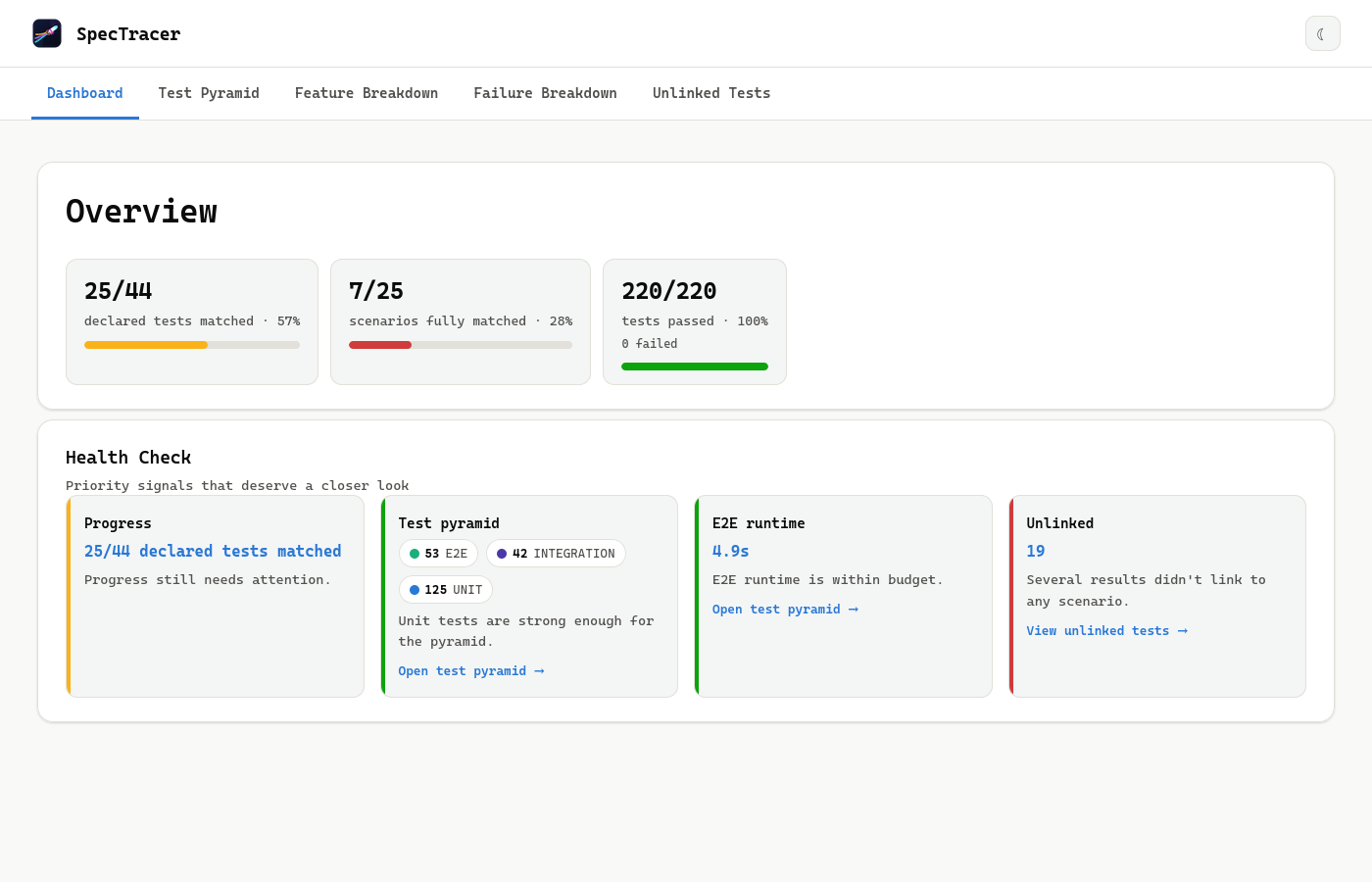
| Number | What it counts |
|---|---|
| Declared tests matched | Of all the @require-* layer/module pairs you declared across every scenario, how many actually have a linked result. This is the headline coverage percentage. |
| Scenarios fully matched | How many scenarios have every layer they declared satisfied. Strictly harder than the number above — one missing layer disqualifies the whole scenario. |
| Tests passed | Straightforward pass rate across all collected results, linked or not. |
If your first run shows 0%, that's almost always a tag mismatch rather than a broken setup. Check the Unlinked Tests page — results with tags that matched nothing are listed there, which usually makes the typo obvious. See Troubleshooting for the full checklist.
Grow from here
Rolling this out across a real codebase works best in this order:
One layer, then more
Start with whichever layer is easiest to tag. Add @require-unit and
@require-integration expectations as those suites get tagged, not before —
otherwise your first report is a wall of red and nobody trusts it.
Commit the config
spectracer.config.json belongs in version control — it's your team's coverage
contract. Add the generated report to .gitignore; it's a build artifact.
Put it in CI
Generate the report on every run and upload it as an artifact. See CI/CD recipes for GitHub Actions, GitLab CI, and Jenkins.
Then make it a gate
Once the numbers are honest, turn on error_on_failure and add health checks to
fail_on. Enforcing a standard you haven't met yet just teaches people to skip
the check.